
















Views
Downloads

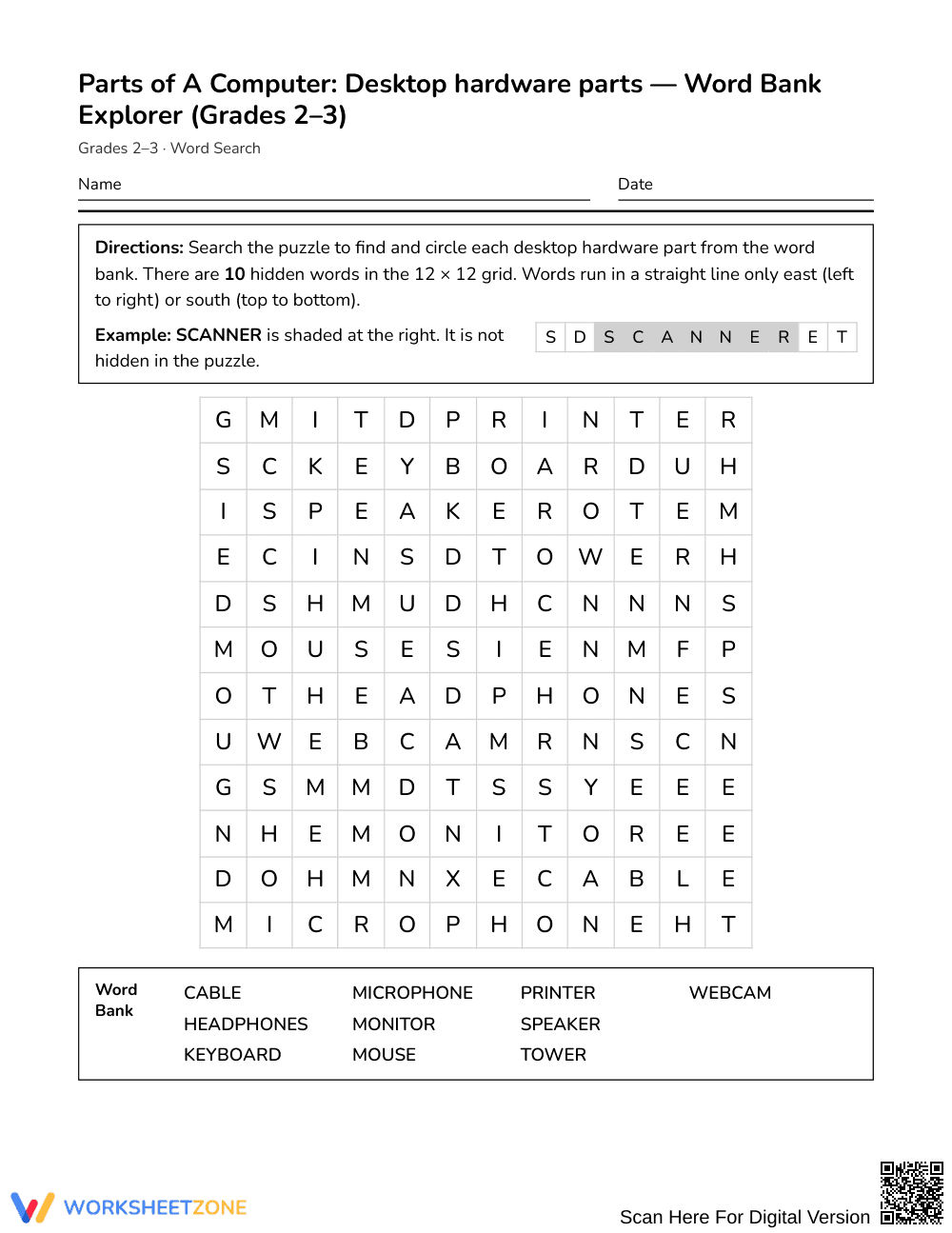

Printable Desktop Hardware Word Search | Grades 2–3 ELA
Paste this activity's link or code into your existing LMS (Google Classroom, Canvas, Teams, Schoology, Moodle, etc.).
Students can open and work on the activity right away, with no student login required.
You'll still be able to track student progress and results from your teacher account.
This desktop hardware word search introduces Grades 2–3 learners to essential computer vocabulary through focused word recognition. Students identify 10 foundational computer components within an organized puzzle grid, strengthening domain-specific spelling and visual scanning skills while building familiarity with modern technology tools.
At a Glance
- Grade: Grades 2–3 · Subject: English Language Arts (ELA)
- Standard: Not standards-assessed — vocabulary enrichment
- Skill Focus: Desktop hardware parts
- Format: 1 page · 10 words · Answer key included · PDF
- Best For: Computer lab enrichment and early finishers
- Time: 15–20 minutes
What's Inside
This resource features a clean, single-page student activity sheet paired with a 2-page complete answer key. The puzzle presents a 12 by 12 letter grid alongside an alphabetized word bank containing 10 core computer terms. Each hardware item is clearly listed to guide student searching, and the accompanying answer key provides highlighted grid coordinates for rapid verification.
Puzzle Structure
Designed intentionally for early elementary learners, the activity utilizes a compact 12 by 12 grid where words run strictly in two directions: East (left-to-right horizontally) and South (top-to-bottom vertically). There are no backward or diagonal letter paths, allowing young students to practice systematic letter scanning without frustration. The alphabetical word bank supports emerging alphabetizing skills while learners locate each hardware component.
Standards Alignment
This activity provides targeted vocabulary enrichment and is not aligned to a formal academic standard. It functions as an engaging, low-stakes supplement to support elementary digital literacy and introductory computer lab units.
How to Use It
Introduce this word search after direct instruction on computer setup to reinforce equipment names, or provide it as a calm, independent station during computer lab rotations. During independent work, observe whether students scan sequentially by initial letter clusters or search randomly, offering guidance on systematic row-by-row scanning. Most learners complete the search in 15 to 20 minutes.
Who It's For
This activity is designed for Grades 2–3 students developing introductory computer literacy in general education classrooms, media centers, or STEM specials. Visual learners and emerging readers benefit from pairing this puzzle with a labeled classroom desktop anchor chart or a hands-on hardware demonstration.
Domain-specific vocabulary instruction in early elementary education provides the structural foundation for technical literacy and digital fluency. According to Fisher & Frey (2014), intentional exposure to specialized content terminology across varied, low-stress practice formats significantly enhances word recognition, conceptual retention, and academic discourse. This 10-word desktop hardware word search delivers focused vocabulary enrichment for Grades 2–3 students by targeting foundational physical computing terms—including monitor, keyboard, mouse, and tower—without formal standard assessment constraints. By engaging in systematic letter search routines within a defined 12 by 12 grid oriented solely across and downward, young learners consolidate orthographic patterns and connect technical terminology to tangible classroom devices. This standalone learning activity provides educators with an accessible, research-aligned tool to reinforce core technology vocabulary, support early scanning fluency, and build foundational digital confidence during initial media lab instruction.


