












Essential Roblox Events Word Search | Grades 4–5 ELA
Paste this activity's link or code into your existing LMS (Google Classroom, Canvas, Teams, Schoology, Moodle, etc.).
Students can open and work on the activity right away, with no student login required.
You'll still be able to track student progress and results from your teacher account.
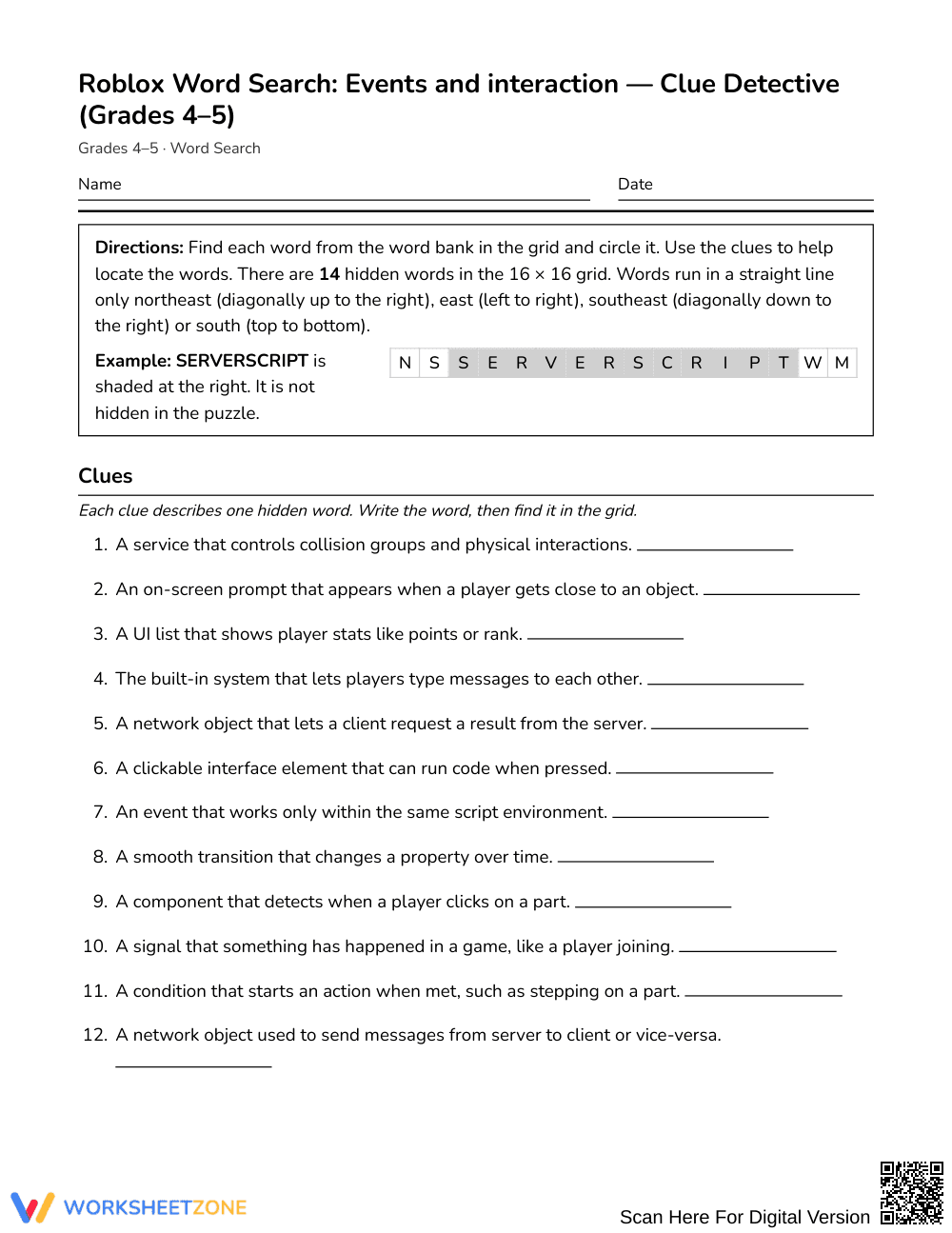
This Grades 4–5 word search builds computer science literacy by challenging students to find 14 key terms focused on events and interaction. Learners read mechanics clues to connect technical programming vocabulary with in-game actions, strengthening reading comprehension and STEM concept recognition.
At a Glance
- Grade: Grades 4–5 · Subject: English Language Arts (ELA)
- Standard: Not standards-assessed — vocabulary enrichment
- Skill Focus: Events and user interaction programming terminology
- Format: 3 student pages · 14 target words · Full answer key included · PDF
- Best For: Independent enrichment, early finishers, and coding clubs
- Time: 20–30 minutes
What's Inside
This 3-page word search includes 14 words highlighting interactive game development concepts, such as RemoteEvent, ClickDetector, and ProximityPrompt. A shuffled word bank prevents simple alphabetical scanning, while clue definitions explain how each term functions in script environments. A complete 3-page answer key provides clear solution paths on the grid for straightforward verification.
Puzzle Mechanics and Structure
This puzzle reinforces technical vocabulary through a structured format:
- Grid Layout: Hidden words are placed inside a 16 x 16 letter grid suited for upper elementary visual scanning.
- Search Directions: Terms run in four specific orientations: northeast (NE), east (E), southeast (SE), and south (S).
- Clue-Driven Solving: Rather than basic letter searching, students read 14 gameplay clues that define how elements like callbacks, triggers, and tweens operate.
Standards Alignment
This activity provides targeted vocabulary enrichment and is not aligned to a formal standard. It introduces upper elementary learners to foundational technical vocabulary used in coding and interactive media. Without standard testing constraints, the worksheet builds contextual reading comprehension and domain-specific vocabulary across multidisciplinary STEM and language arts settings.
How to Use It
Use this word search during an introductory unit on game design or as an engaging vocabulary review station after direct instruction. Have students read each clue aloud with a partner to discuss the function before circling the term in the grid.
For formative assessment, observe whether learners reference the clue definitions while searching; asking a student to explain what a trigger or callback does checks real conceptual understanding. Students typically complete the puzzle in 20 to 30 minutes.
Who It's For
This resource is designed for Grades 4–5 students interested in gaming, programming, or digital technology. For learners who need visual support, offer highlighters to mark key terms inside clue definitions before searching the 16 x 16 grid. Pair this activity with an introductory block-coding tutorial or an interactive game planning guide to connect technical terms with hands-on practice.
Designed for vocabulary enrichment rather than formal standards testing, this puzzle focuses on events and interaction vocabulary in game design. Integrating high-interest technical concepts into literacy instruction directly reflects findings from Fisher & Frey (2014), who demonstrated that intentional domain-specific vocabulary acquisition accelerates reading comprehension across content areas when paired with clear contextual definitions. By exploring 14 technical terms, such as triggers, callbacks, and remote functions, learners in Grades 4–5 encounter foundational computer science concepts through an accessible, game-centered format. The clue-driven layout prompts students to evaluate how software systems respond to user input, transforming a traditional word search into an authentic knowledge-retrieval exercise. Teachers can readily incorporate this 3-page printable activity to engage reluctant readers, support after-school coding clubs, and reinforce cross-curricular STEM concepts through collaborative classroom exploration. The included 3-page answer key provides complete transparency for quick checking during self-directed study or learning stations.


