


















Views
Downloads

Ready Output Devices Word Search | Grades 2–3 ELA

Paste this activity's link or code into your existing LMS (Google Classroom, Canvas, Teams, Schoology, Moodle, etc.).
Students can open and work on the activity right away, with no student login required.
You'll still be able to track student progress and results from your teacher account.
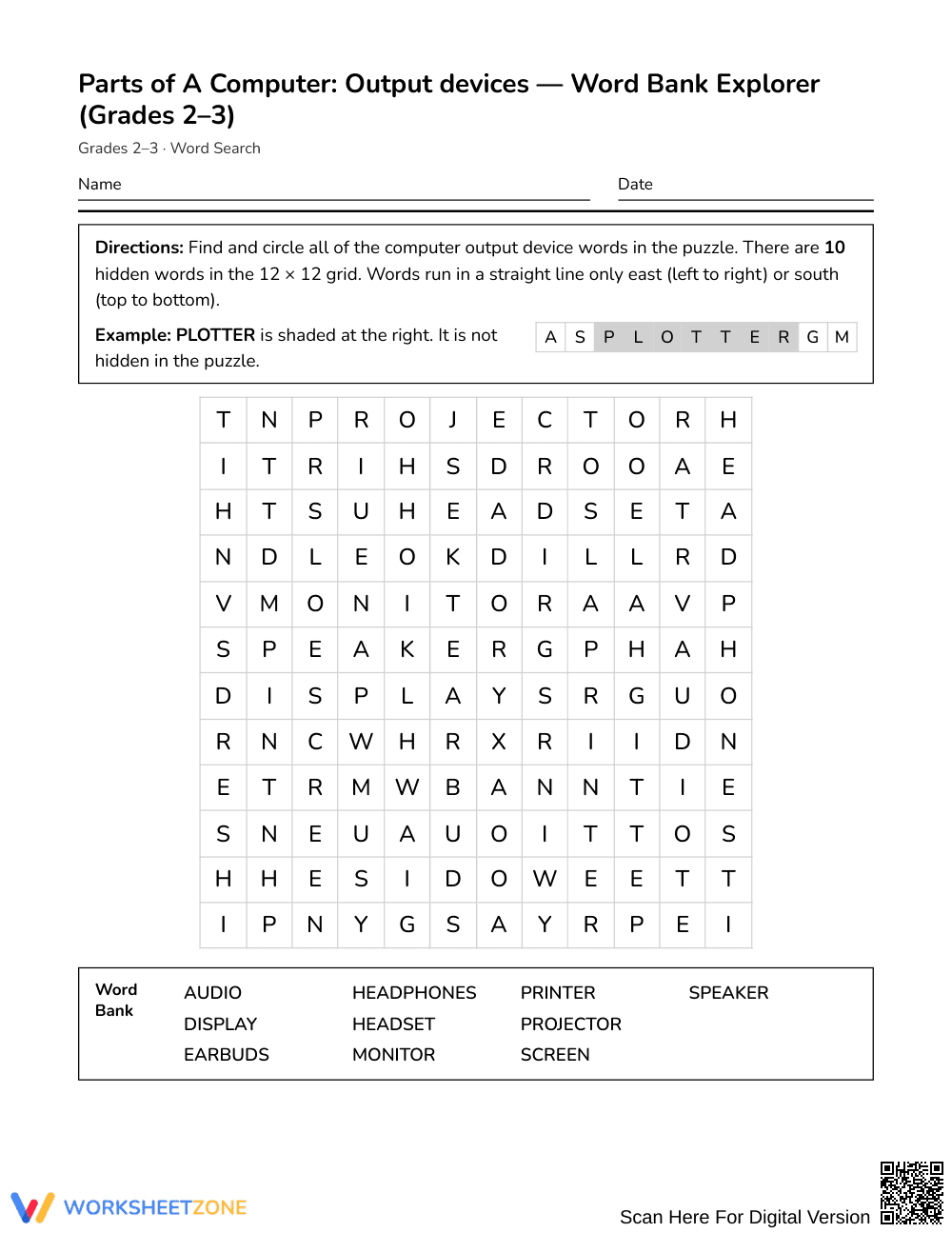
This Grades 2–3 computer science and literacy word search reinforces foundational technology vocabulary by challenging students to identify 10 essential hardware terms. Learners locate key output devices within a structured puzzle grid while connecting clear definitions to real-world technology tools, strengthening domain-specific vocabulary retention, visual scanning skills, and orthographic awareness.
At a Glance
- Grade: Grades 2–3 · Subject: English Language Arts (ELA)
- Standard: Not standards-assessed — vocabulary enrichment
- Skill Focus: Computer output devices
- Format: 1 page · 10 words · Answer key included · PDF
- Best For: Vocabulary centers, sub plans, early finishers
- Time: 15–20 minutes
What's Inside
The activity sheet delivers a clean, single-page word search containing 10 high-utility technology terms alongside descriptive definitions for each target word. An alphabetical word bank guides independent searching, while a comprehensive two-page answer key provides clear letter-grid highlighting for rapid evaluation or self-checking.
Puzzle Structure and Mechanics
The activity is built specifically for early elementary learners to prevent frustration while reinforcing visual literacy:
- Grid Dimensions: A compact 12 × 12 letter grid accommodates emerging readers without visual crowding.
- Directional Layout: Words run strictly from left to right (East) and top to bottom (South), honoring standard English reading orientation.
- Alphabetical Support: An organized word list paired with clear device clues allows students to cross-reference meaning with letter sequences.
Standards Alignment
This activity serves as supplemental vocabulary enrichment and is not aligned to a formal state standard. It provides practical reinforcement of informational, domain-specific technology terms commonly introduced in elementary digital literacy and media curricula.
How to Use It
Deploy this resource during an introductory computer lab rotation immediately following direct instruction on input versus output hardware. Alternatively, place it in an independent literacy station as a calm, self-directed task for early finishers. While students search, monitor letter-scanning habits to confirm they identify multi-letter chunks rather than random single letters. Expect completion within 15 to 20 minutes.
Who It's For
This printable suits general education students in Grades 2–3, introductory technology classrooms, and English language learners acquiring foundational hardware terms. Pair this search with an interactive hardware labeling anchor chart or a physical computer sorting center.
Research by Fisher & Frey (2014) highlights that purposeful exposure to domain-specific vocabulary across diverse print formats cements conceptual understanding during early literacy development. This printable word search introduces 10 essential computer output device terms within an age-appropriate 12 × 12 grid. By constraining letter paths exclusively to left-to-right and top-to-bottom trajectories, the puzzle provides scaffolded visual tracking practice that mirrors natural English reading mechanics. Coupling target terms with explicit functional clues ensures that students do not merely hunt for letter sequences in isolation, but actively link computer vocabulary to concrete hardware functions. Designed for zero teacher preparation, the single-page format offers structured reinforcement that supports vocabulary acquisition, fine-motor tracing, and independent task completion in elementary media labs, general education classrooms, or intervention settings.


