The Addition Worksheet Generator on Worksheetzone makes it easy to generate personalized math worksheets in just a few steps. Whether you’re a teacher preparing classroom activities or a parent looking for extra home practice, this tool lets you customize problems to match your learner’s skill level. You can choose number ranges, problem formats, and layouts, ensuring each worksheet meets your specific needs. In this guide, we’ll walk you through the process of using the Addition Worksheet Generator so you can quickly design engaging, effective addition practice sheets.
What is the Addition Worksheet Generator?
The Addition Worksheet Generator is an online tool on Worksheetzone designed to help you generate custom addition practice sheets quickly and easily. It allows you to set specific parameters – such as number range, number of problems, and layout style – so your worksheets perfectly match your students’ learning goals. This flexibility makes it suitable for all skill levels, from early learners just starting with single-digit sums to advanced students practicing multi-digit addition. Once created, your worksheet is ready to print or assign digitally, making it a time-saving solution for both classroom and home learning.

Step-by-Step Guide to Using the Addition Worksheet Generator
The Addition Worksheet Generator is designed to be intuitive, so you can create high-quality math practice sheets in minutes. This step-by-step guide will walk you through the entire process to ensure you make the most of its powerful features.
Step 1: Access the Addition Worksheet Generator
You can start in two simple ways:
Option 1: Go directly to the Addition Worksheet Generator landing page, click the button “Start Now” to begin creating your worksheets.

Option 2: From the Worksheetzone homepage, hover over the “Create Worksheet” button on the header menu and select “Addition Worksheet Generator” from the list.

Once opened, you’ll see a split-screen interface:
- Left side: All customization settings
- Right side: A real-time preview of your worksheet as you make changes.

Step 2: Choose Your Display Style
Just like the Subtraction tool, the addition generator offers two main ways to present problems:
Default Layout: Standard vertical or horizontal problem formats, ideal for straightforward calculations.
- Includes two sub-layouts for variety.

Number Bounds Layout: Problems displayed in linked circles, perfect for visual learners.
- Offers four different arrangements to make learning more engaging.

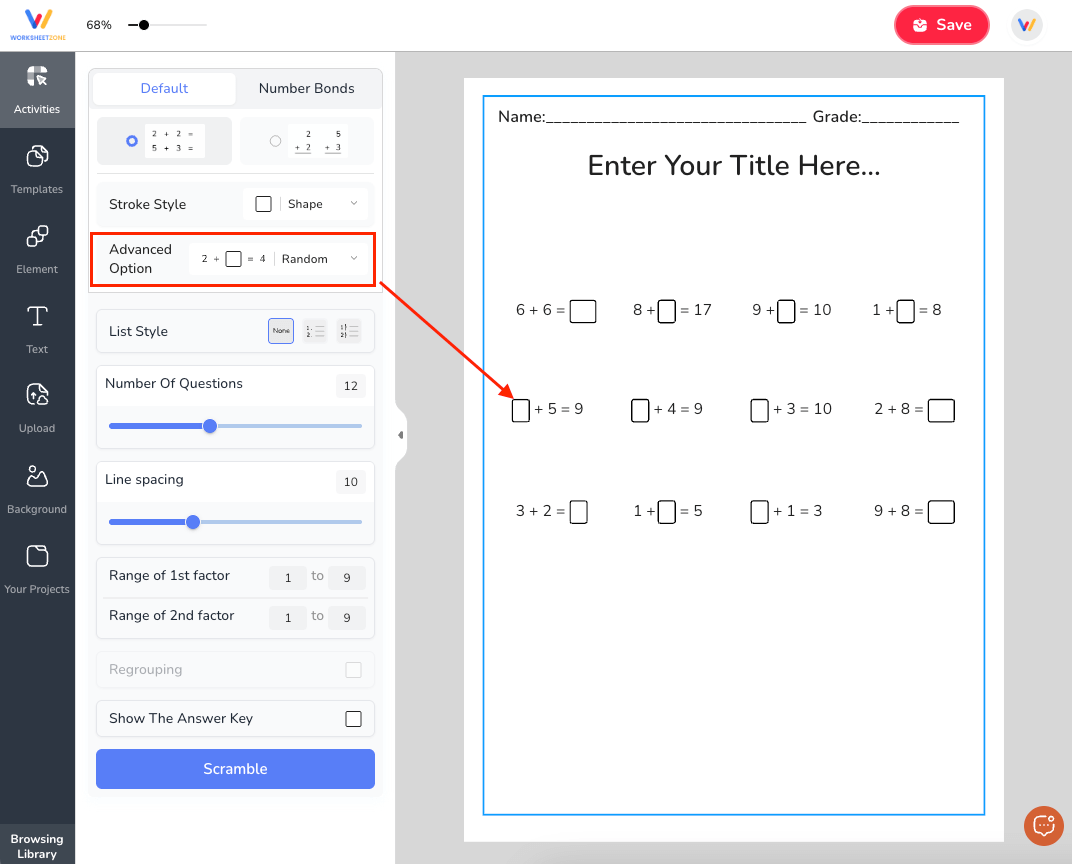
Step 3: Select Problem Mode
Decide how problems will be structured:
- Default Mode: The answer box always appears in the sum position for students to fill in.
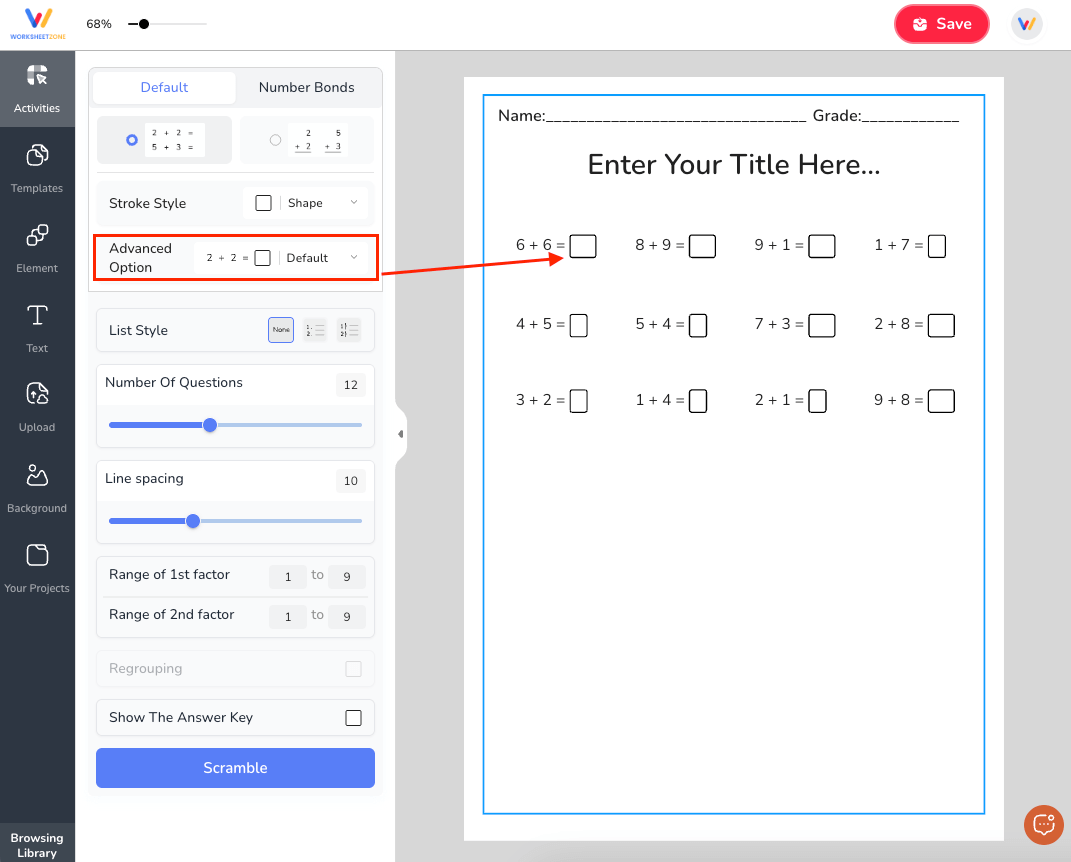
- Random Mode: The blank could be in any position (one of the addends or the sum), adding variety and challenge to the practice.
Step 4: Customize Your Worksheet
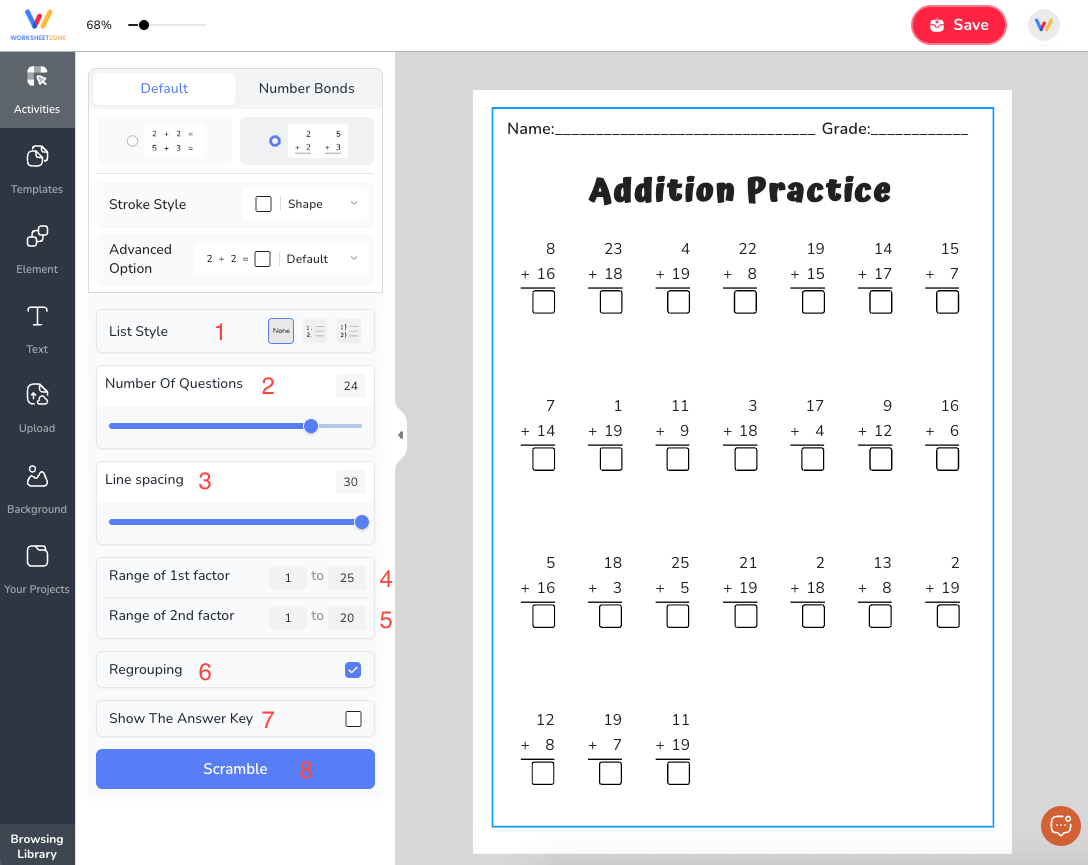
Tailor every detail to your needs:
1. List Style:
- No numbering
- Numbered with a period (1. 2. 3.)
- Numbered with a comma (1, 2, 3,)
2. Number of Questions: Set up to 30 addition problems per page.
3. Line Spacing: Adjust the space between problems for comfortable writing.
4. Range of 1st Addend: Set minimum and maximum values (e.g., 1-10).
5. Range of 2nd Addend: Define the range for the second number (e.g., 1-20).
6. Regrouping: Include addition problems that require carrying over.
7. Show the Answer Key: Option to print a solutions page for quick checking.
8. Scramble: Randomize the problem order for varied practice.
9. Visual Design: Customize font style, size, color, alignment, and spacing to make worksheets more engaging.
Step 5: Save and Share Your Worksheet
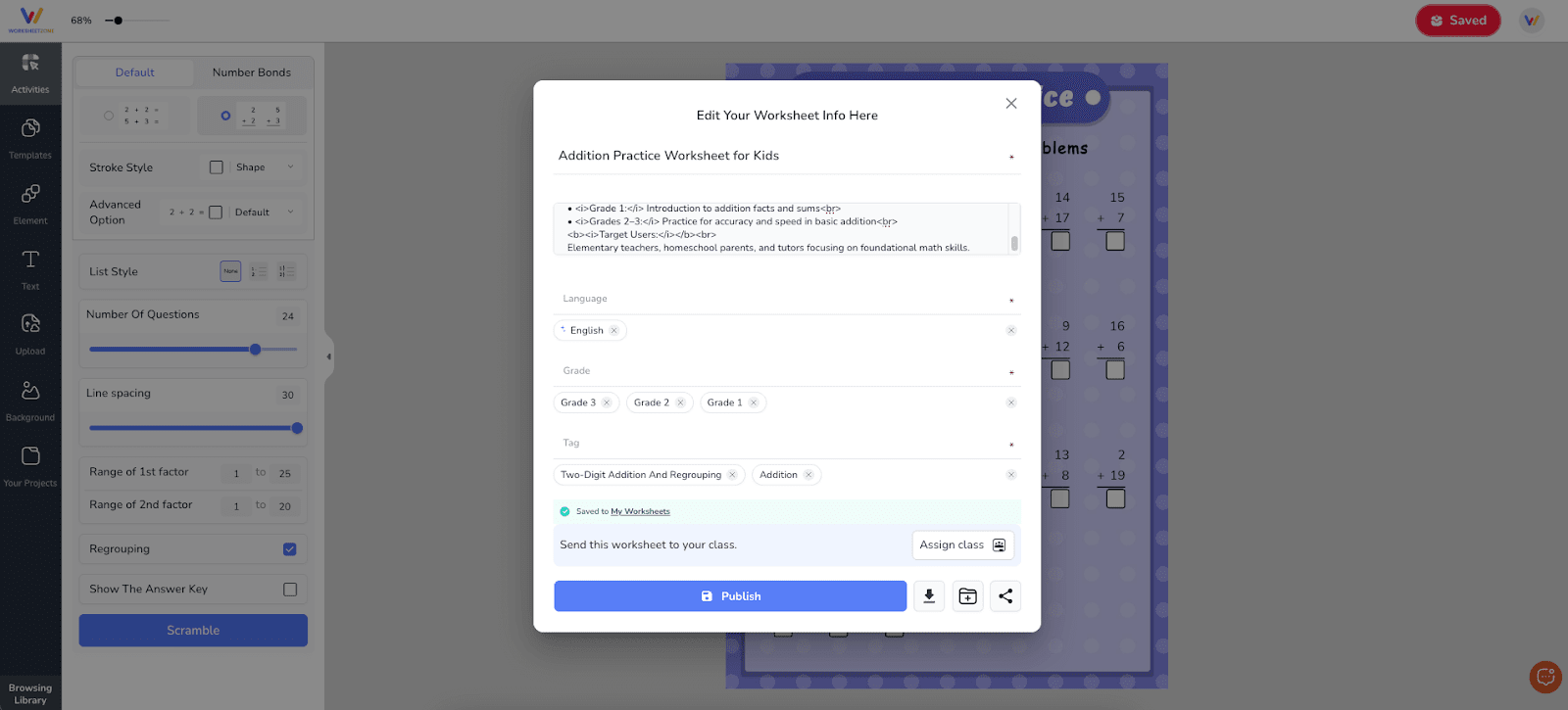
When you’re satisfied with your worksheet:
1. Click “Save” to store it in “My Library”.
2. From there, you can:
- Download as PDF for printing.
- Assign directly to students in WSZ Classie.
- Use in a live game or as a self-paced activity for interactive learning.
Other Popular Tools for Making Addition Worksheets
If you’re looking for more ways to make addition worksheets, several well-known online tools offer helpful features for teachers, parents, and tutors. Here are some notable options worth exploring:
1. Education.com – Addition Worksheet Generator
A widely recognized educational platform, education.com offers an easy-to-use addition worksheet generator with plenty of customization options.

Highlights:
- User-friendly interface.
- Customizable number ranges, layouts, and problem types.
- Generates worksheets with or without answer keys.
Limitations:
- Some downloads and advanced features require a paid subscription.
- Daily or monthly usage may be restricted for free accounts.
2. Super Teacher Worksheets – Addition Worksheet Generator
Super Teacher Worksheets provides ready-to-use and customizable addition worksheets for various grade levels.

Highlights:
- Offers multiple worksheet formats, including vertical, horizontal, and word problem layouts.
- Includes visual aids like number lines and pictures for younger learners.
Limitations:
- Most printable resources require membership access.
- Limited flexibility for highly personalized worksheet designs.
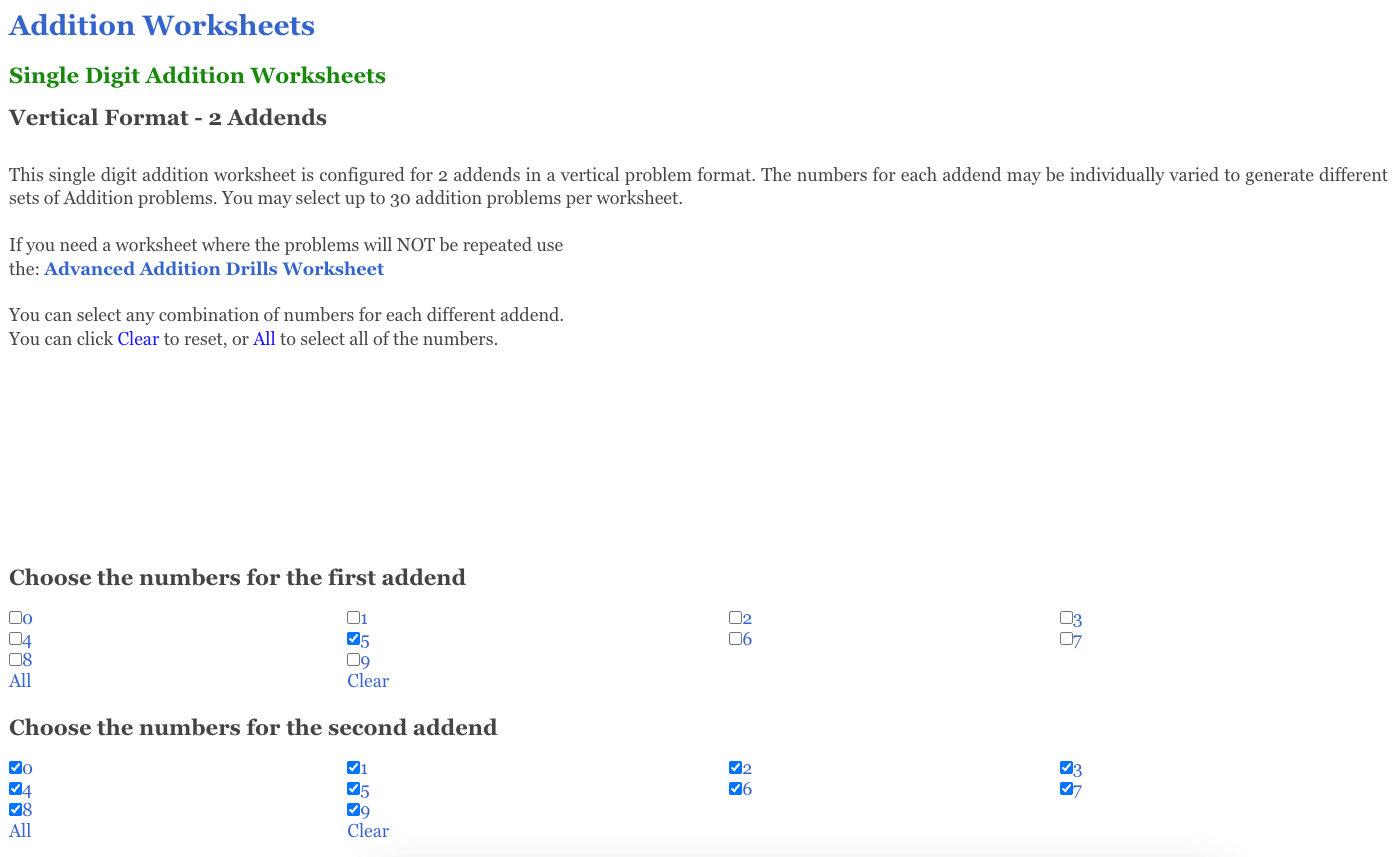
3. Math-Aids.com – Dynamically Created Addition Worksheets
Math-Aids.com allows users to create dynamically generated addition worksheets that are unique each time they’re made.
Highlights:
- Customizable number ranges, problem styles, and difficulty levels.
- Generates unique worksheets for ongoing practice.
- Instant PDF downloads for printing and sharing.
Limitations:
- The website interface is functional but not as visually modern.
- Does not offer interactive or digital completion options – print only.
Final Thoughts
The Addition Worksheet Generator on Worksheetzone is a powerful, time-saving tool for generating tailored math practice sheets that match your students’ skill levels. With its wide range of customization options, real-time preview, and flexible saving and sharing features, you can design worksheets that keep learners engaged while reinforcing essential addition skills. Whether for classroom use, homework, or extra practice at home, this tool helps you deliver targeted learning with ease.
Start creating your own worksheets today with the Addition Worksheet Generator and give your students the engaging practice they need to master addition.