Are you tired of seeing bored faces in your classroom? Looking for fun games to play in class on computers that actually teach something? Say hello to Worksheetzone’s Live Game feature! Whether you need quick games to play in the classroom or engaging games to play during class online, this guide has got you covered. Let’s dive into how you can use this awesome tool to turn your lessons into exciting adventures!
In this guide, we will explore how to use Worksheetzone’s Live Game feature effectively, explaining each mode in detail and walking you through the step-by-step process of hosting a live quiz. Whether you’re a teacher aiming to engage your class or a student looking for a more interactive way to study, this comprehensive guide will ensure you get the most out of the Worksheetzone platform.
Why Choose Worksheetzone’s Live Game?
Before we jump into the how-to, let’s talk about why Worksheetzone’s Live Game is a game-changer for teachers and students alike:
- Beats boredom: No more games to play in the class when bored – these are games students will be excited to play!
- Works anywhere: Perfect for both games to play in class indoors and online learning environments.
- Quick setup: Ideal for those moments when you need quick games to play in the classroom.
- Learning in disguise: Students have so much fun, they forget they’re learning!
Two Awesome Ways to Play: Instructor-Paced vs. Classic Mode
Worksheetzone’s Live Game offers two cool modes to fit your teaching style:
1. Instructor-Paced Mode: You’re in the Driver’s Seat
This mode is perfect when you want to guide your students through the game step-by-step.

Why it’s awesome:
- You control the pace (great for younger kids or tricky topics): Instructor-paced means that the host will decide when to move to the next question, ensuring that no one is left behind. Therefore, as a host, you can totally control the game’s pace.
- Pause for discussions and explanations: As you can completely control the game, you can pause whenever you want to provide time for discussion.
- Keep everyone on the same page: This is due to the fact that the host sets the pace, meaning students cannot skip ahead. This allow the host to assess understanding in real-time.
Best for: Introducing new concepts or guiding less independent learners.
2. Classic Mode: Let Students Take the Wheel
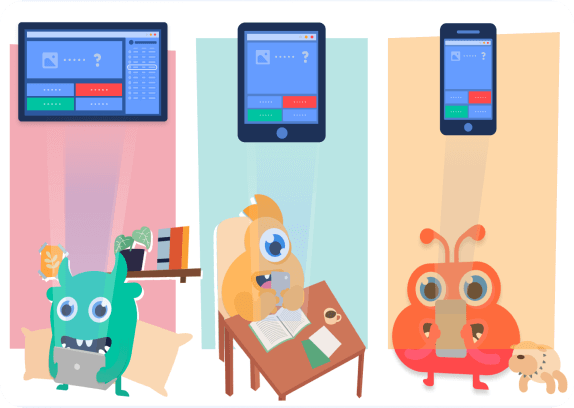
When you want students to zoom through at their own speed, Classic Mode is your go-to.
Why it’s awesome:
- Students move at their own pace: Unlike the Instructor-Paced mode, on Classic Mode, you can move through the quiz at your own pace which encourages autonomy and self-directed learning.
- Instant feedback keeps them engaged: You can receive instant feedback on your performance, allow you to identify areas of strength and improvement.
- Leaderboard adds a dash of friendly competition: This competitive edge will motivate you and others to perform your best on the game.
Best for: Review sessions, homework, or more independent learners.
How to Host an Epic Live Game on Worksheetzone?
Ready to turn your lesson into the most fun game to play in class on the computer? Follow these simple steps:
1. Log in and load up: Sign into Worksheetzone and pick your quiz.
You can choose one of available resources at Worksheetzone Quiz or create your own quiz. Click the “Play as a quiz” button then choose “Start Teaching Activities” to select your next activity.

2. Choose your mode: Go for Instructor-Paced or Classic Mode – whatever fits your style!

3. Tweak the settings: Adjust player limits, timers, and scoring to make it perfect.
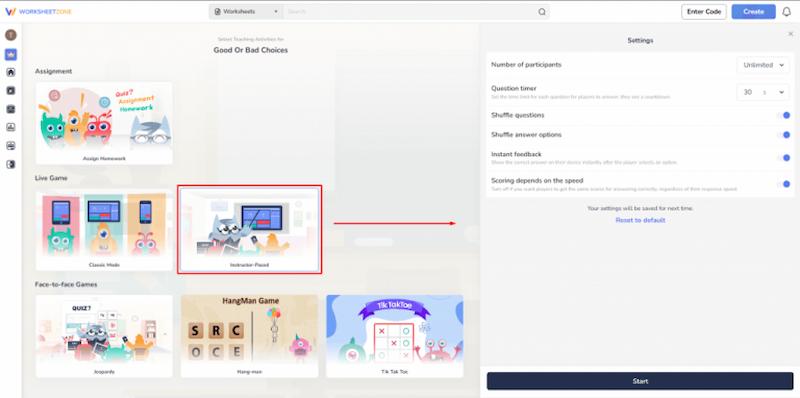
4. Invite your players: Share a direct URL, number code, QR code, via Microsoft Teams or Google Classroom, or send an invitation to get everyone in the game.

5. Let the games begin: Hit “Start” and watch the learning magic happen!
Once all participants have joined the lobby, you’re ready to begin the quiz. The process will differ slightly depending on whether you’re using Instructor-Paced or Classic Mode.
- Instructor-Paced: The host will click the “Next” button to move on to the next question. Host can simultaneously track the performance of participants in the “Leaderboard” screen.
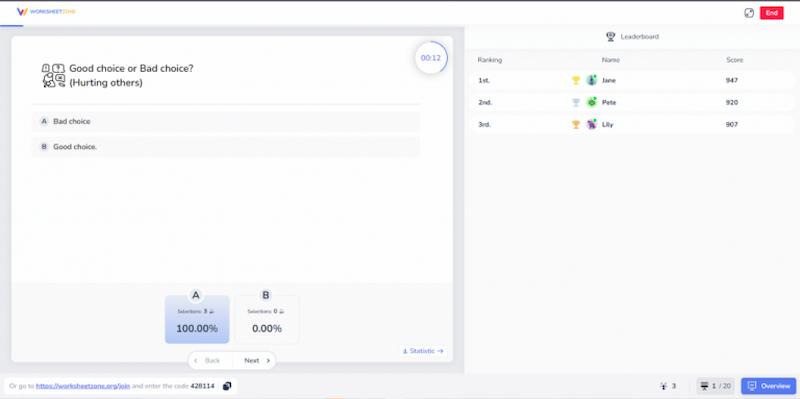
- Classic Mode: After the game starts, students move through questions at their own speed. The host can track participants’ rankings and accuracy through the “Overview” screen.
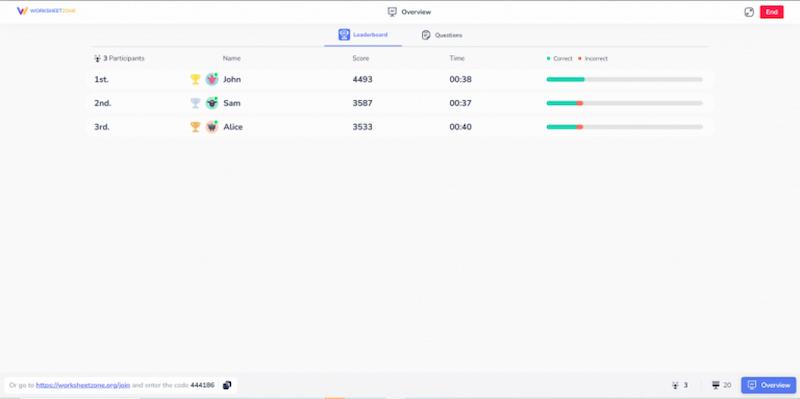
6. Review and celebrate: Check out the results and give shoutouts to top performers.
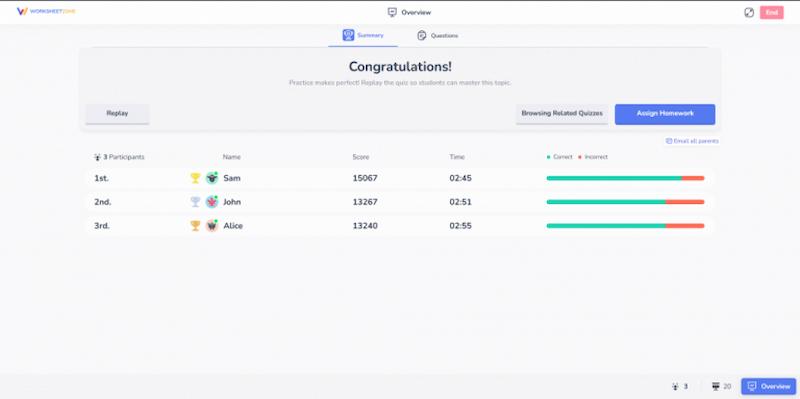
Once the quiz has finished, the host will see the “Summary” and “Questions” screens. At the “Summary” screen, participants’ rankings and detailed data are shown. The “Questions” screen shows a breakdown of how accurately participants answered each question.
Worksheetzone also provides several options for how to proceed: Restart the game, Browsing Related Quizzes or Assign the quiz as homework.
Pro Tips for Live Game Success
- Mix it up: It can not be denied that each mode has its own interesting features; however, alternating between two modes will bring more fun to your classroom.
- Team up: With the use of Classic Mode, collaboration can be boosted by making competition between groups.
- Reward creativity: There will be several questions which have numerous correct answers. Therefore, it is highly recommended that you give bonus points for certain types of responses to encourage players’ creativity and competitiveness as well.
- Debrief: Remember that it is always necessary to discuss what has been learned after the game to reinforce students’ knowledge, helping them remember the lesson longer.
Worksheetzone’s Live Game: More Than Just Fun
While Worksheetzone’s Live Game is definitely one of the most fun games to play in class on a computer, it’s so much more than that. It’s a powerful tool that:
- Boosts engagement: Say goodbye to glazed-over eyes and hello to eager learners.
Not only students, but also even teachers are getting more and more bored with boring teaching methods, blanding lessons with no motivation. That’s why Worksheetzone is here to solve that problem. This is not only a powerful and interesting tool in teaching, but also in connecting students in class, helping to easily digest the lesson as well as get on well with their classmates.
- Provides instant feedback: Both you and your students know right away what needs work.
With Worksheetzone’s Live Game feature, teachers can quickly identify strengths and weaknesses to provide instant feedback to students. This helps students correct mistakes in real-time, reinforcing learning, while enabling teachers to adjust instruction and offer targeted support, ensuring no student falls behind.
- Adapts to your needs: Whether you’re teaching remotely or in person, it’s got you covered.
Worksheetzone’s Live Game feature is highly flexible, adapting perfectly to both remote and in-person teaching environments. Whether you are running virtual lessons or classroom activities, it allows you to engage students in real-time. This flexibility ensures that regardless of the setting, students are connected, engaged, and fully immersed in the learning experience.
- Makes learning stick: The game format helps information stay in students’ minds longer.
With Worksheetzone’s Live Game, students might no longer have to try to cram a lot of boring theoretical knowledge; instead, they can digest it much more easily by learning it through interactive live-game.
Ready to Level Up Your Teaching?
Gone are the days of searching for games to play in the class when bored. With Worksheetzone’s Live Game, you’ve got an endless supply of engaging, educational activities right at your fingertips. Whether you need quick games to play in the classroom or full-lesson interactive experiences, this tool has got your back.
So why wait? Dive into Worksheetzone’s Live Game feature today and start creating Live Games that will have your students begging for more. Learning has never been this much fun!
Remember, in the world of education, the best teachers don’t just teach – they create experiences. With Worksheetzone’s Live Game, you’re not just a teacher; you’re a game master, guiding your students through exciting learning adventures. Get ready to be the coolest teacher in school!