The Word Scramble Generator on Worksheetzone makes it easy to generate engaging word puzzles for your students. Perfect for reinforcing spelling, vocabulary, and critical thinking skills, this tool lets you instantly jumble words from any word list you choose. Whether you’re teaching in a classroom or at home, you can generate printable worksheets in just a few clicks – no design skills needed. In this quick tutorial, we’ll show you exactly how to use the Word Scramble Generator to build custom activities that are both fun and educational.
What is a Word Scramble Generator?
A Word Scramble Generator is an interactive tool that automatically mixes up the letters of words to create puzzles for students to solve. The goal is for learners to unscramble the jumbled letters and identify the correct word. On Worksheetzone, this tool allows teachers and parents to enter a custom word list, and it instantly produces a printable worksheet with scrambled versions of those words. It’s a fun and effective way to reinforce spelling, build vocabulary, and sharpen problem-solving skills – all through engaging wordplay.

Step-by-Step Guide to Using the Word Scramble Generator
Creating your word scramble worksheet on Worksheetzone is fast, easy, and flexible. Whether you’re preparing a vocabulary review or a fun brain teaser, this guide will walk you through each step to build and download a personalized puzzle in just minutes.
Step 1: Access the Tool
You can open the Word Scramble Generator using either of the following options:
Option 1: Use the Direct Link
- Go straight to the Word Scramble Generator landing page.
- Click “Start Now” to begin creating your worksheet.

Option 2: Navigate from the Header
- From the Worksheetzone header, hover over the “Create Worksheet” tab located on the top left menu bar.
- Click on “Word Scramble Generator” from the dropdown list to open the tool.

Step 2: Choose Your Format: Word or Sentence Scramble
Once you’ve opened the generator, begin by selecting your preferred format. The tool offers two options:
- Word Scramble: Each entry becomes a single jumbled word.
- Sentence Scramble: The words within a full sentence are shuffled for students to reorder correctly.

Use the toggle buttons at the top of the editor to switch between formats before entering your content.
Step 3: Input your Content
Depending on your chosen format, you can add your content in three ways:
For Word Scramble:
- Click the “Topic” button to choose from ready-made word lists curated by Worksheetzone (e.g., Animals, Space, Emotions).
- Manually type your list of words into the input box.
- Or generate word list with AI instantly – just type a prompt like “10 ocean-themed words” and let Worksheetzone’s AI do the work for you.

For Sentence Scramble: Enter full sentences directly, and the tool will automatically rearrange the word order.
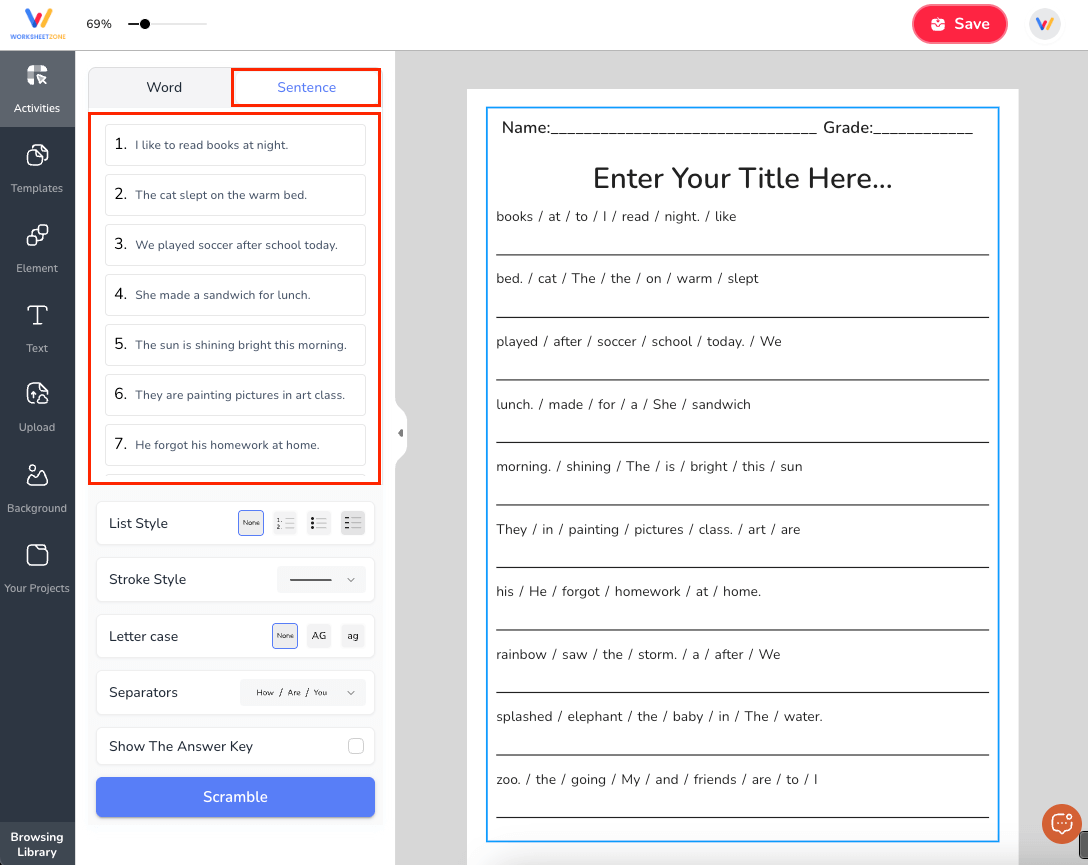
Tip: Use the “Scramble” button to reshuffle the letters or word order if you want a different variation.
Step 4: Customize Your Worksheet
Personalize your worksheet’s layout and difficulty level using the customization options available:
- List Style: Choose numbered, bulleted, or no list
- Stroke Style: Select solid, dashed, or dotted lines for student responses
- Letter Case: Display answers in uppercase, lowercase, or mixed cases
- Show Word Bank: Add a word bank at the bottom to support learners
- Show Answer Key: Generate an answer key on the page
If you’re creating a Sentence Scramble, you can also define Separators (e.g., spaces, dashes, slashes) to control how words are displayed.
Step 5: Save and Use Your Worksheet
When you’re satisfied with the worksheet:
- Click “Save”
- Enter a worksheet title, short description, grade level(s), language, and tags
- Choose how you’d like to use it:
- Download as a printable PDF
- Assign directly to students via the Worksheetzone Classroom
- Host a Live Game for real-time engagement

All your saved worksheets will be stored in My Library, where you can edit, reprint, or reassign them anytime.
Other Word Scramble Generators You Can Try
If you’re exploring more ways to create engaging word scramble worksheets beyond Worksheetzone, here are some additional tools worth checking out. Each offers unique features that can support your classroom or at-home learning goals. While some tools have premium features, they all provide valuable resources to enhance your teaching experience.
1. Education.com Word Scramble Generator
Education.com offers a teacher-friendly word scramble maker that’s ideal for both classroom and home use. Its simple design and themed features make it especially appealing for younger learners.

Highlights:
- Offers instant preview and automatic answer key generation.
- Seasonal and holiday-themed backgrounds add visual appeal to each worksheet.
Things to Note:
- Printable downloads and some features may require a registered or premium account.
- Free accounts might face monthly creation limits and fewer design options.
2. The Teacher’s Corner Word Scramble Maker
This no-frills tool is a go-to for educators who want full worksheet-building freedom without needing to log in. It’s straightforward, flexible, and completely free to use.

Highlights:
- Customizable with fonts, colors, and even image addition.
- Unlimited use – ideal for frequent worksheet creators.
Things to Note:
- The interface is straightforward but feels a bit outdated.
- Advanced formatting may involve trial and error.
- The site included ads, which may distract from the design experience.
3. Super Teacher Worksheets Word Scramble Generator
Designed with elementary classrooms in mind, this tool makes creating and printing word scrambles quick and easy. It’s especially helpful if you’re already using other Super Teacher resources.

Highlights:
- Supports long or short word lists and generates both puzzles and answer keys.
Things to Note:
- Full worksheet access often required a paid membership.
- Visual customization is limited compared to template-based platforms.
- Some advanced features are locked for non-members.
Final Thoughts
Generating fun and effective word scramble worksheets has never been easier, thanks to tools like the Worksheetzone Word Scramble Generator. Whether you’re teaching spelling, building vocabulary, or just adding a creative twist to your lesson, this tool helps you generate personalized activities in minutes. With flexible options like word or sentence mode, pre-made topic lists, and printable formats, it’s built to save time while keeping students engaged.
Ready to get started? Try the Word Scramble Generator on Worksheetzone and explore endless possibilities for interactive learning.