


























1 / 2
0
Views
0
Downloads


0.0
0
Save
0 Likes
Share
M-G-7-3_Lesson 3 Exit Ticket and KEY
0 Views
0 Downloads
Paste this activity's link or code into your existing LMS (Google Classroom, Canvas, Teams, Schoology, Moodle, etc.).
Students can open and work on the activity right away, with no student login required.
You'll still be able to track student progress and results from your teacher account.
Information
Description
What It Is:
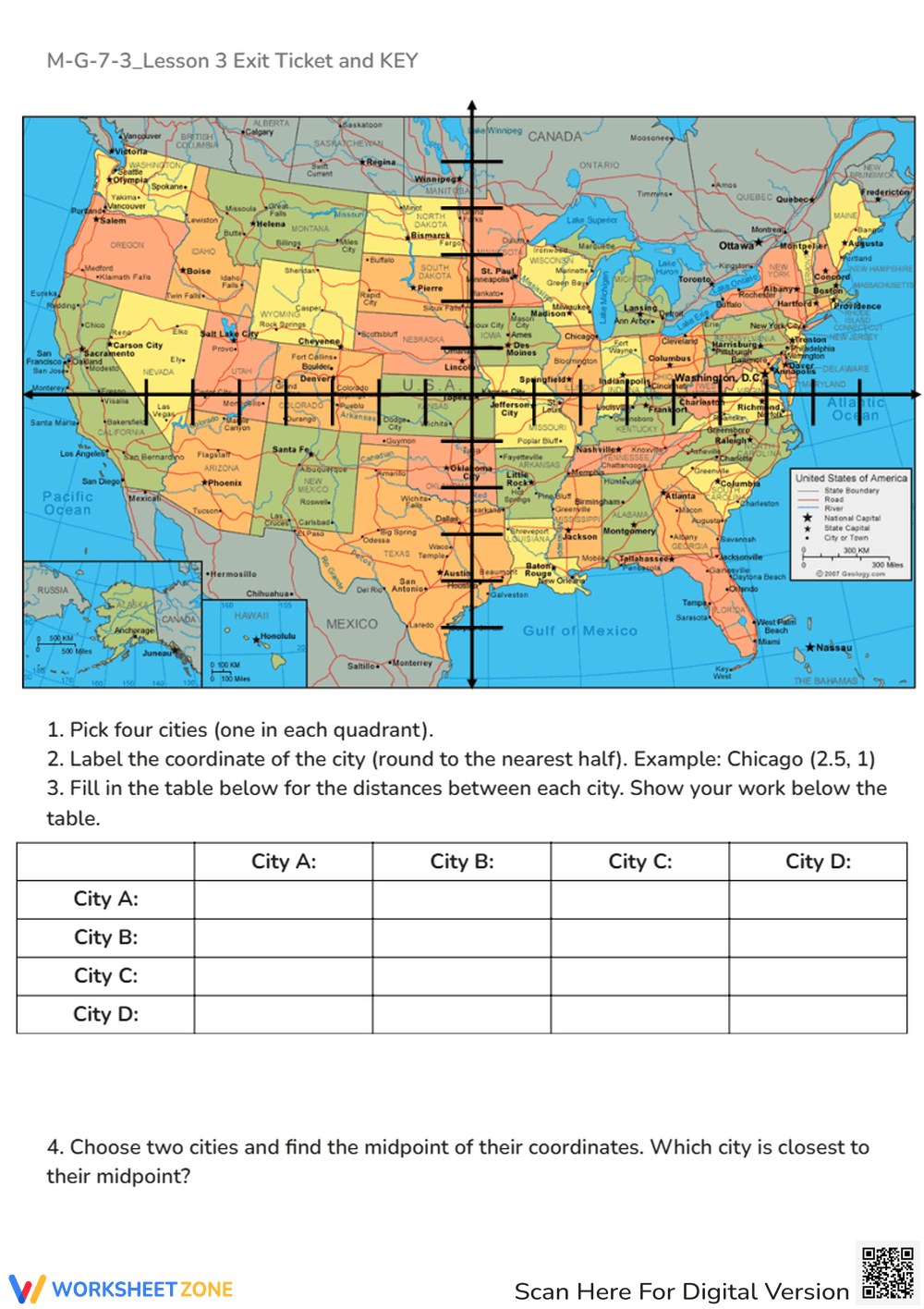
An interactive Coordinate Plane Map worksheet that lets students apply coordinate geometry to real-world geography. Learners plot U.S. cities, calculate distances, and determine midpoints using the coordinate plane and distance formula.
Why Use It:
This activity connects math to geography, helping students visualize coordinate quadrants while practicing key geometry formulas. It reinforces spatial reasoning, distance calculation, and midpoint understanding through engaging real-world examples.
How to Use It:
• Choose four cities (one from each quadrant of the map).
• Round each city’s coordinates to the nearest half unit.
• Use the distance formula to find the distances between each city and record them in the table.
• Select two cities and calculate the midpoint between them to determine which city lies closest to that midpoint.
• Ideal for collaborative learning or geography-based math projects.
Grade Suitability:
Best for Grades 7–10.
• Grade 7: Introduction to coordinates and quadrants.
• Grades 8–10: Reinforcement of the distance and midpoint formulas in coordinate geometry.
Target Users:
Perfect for students, teachers, and homeschool learners exploring real-world math connections through coordinate geometry and U.S. geography.
An interactive Coordinate Plane Map worksheet that lets students apply coordinate geometry to real-world geography. Learners plot U.S. cities, calculate distances, and determine midpoints using the coordinate plane and distance formula.
Why Use It:
This activity connects math to geography, helping students visualize coordinate quadrants while practicing key geometry formulas. It reinforces spatial reasoning, distance calculation, and midpoint understanding through engaging real-world examples.
How to Use It:
• Choose four cities (one from each quadrant of the map).
• Round each city’s coordinates to the nearest half unit.
• Use the distance formula to find the distances between each city and record them in the table.
• Select two cities and calculate the midpoint between them to determine which city lies closest to that midpoint.
• Ideal for collaborative learning or geography-based math projects.
Grade Suitability:
Best for Grades 7–10.
• Grade 7: Introduction to coordinates and quadrants.
• Grades 8–10: Reinforcement of the distance and midpoint formulas in coordinate geometry.
Target Users:
Perfect for students, teachers, and homeschool learners exploring real-world math connections through coordinate geometry and U.S. geography.


