Teaching young children to write their names is a key step in early literacy, and Worksheetzone’s Name Tracing Generator makes it simple and fun. This easy-to-use tool allows you to generate personalized name tracing worksheets tailored to each child. Whether you’re a teacher preparing class materials or a parent supporting at-home learning, you can quickly make worksheets that help build letter recognition, handwriting confidence, and fine motor skills. In this tutorial, we’ll walk you through every step so you can start generating customized name tracing sheets in just minutes.
What Is a Name Tracing Generator?
A name tracing generator is an online tool that allows you to make personalized handwriting worksheets using any name or word you enter. Designed especially for early learners, this tool automatically formats the name into traceable letters – usually dotted or dashed – so children can practice writing by following the lines. It’s a popular resource in preschool and kindergarten classrooms, helping kids build fine motor control, letter recognition, and confidence in writing their own names. With just a few clicks, you can generate practice sheets that are both educational and engaging for young learners.

Step-by-Step to Generate a Name Tracing Worksheet on Worksheetzone
Follow these simple steps to generate a personalized name tracing worksheet using Worksheetzone’s powerful and intuitive tool. Whether you’re creating worksheets for a classroom full of students or just one child at home, this guide will help you produce high-quality handwriting practice sheets in minutes.
Step 1: Access the Name Tracing Generator
There are two convenient ways to access the Worksheetzone Name Tracing Generator:
Option 1: Use the Direct Landing Page
For the quickest access, you can directly navigate to the Name Tracing Generator landing page on Worksheetzone.
- Simply type the name into the box and click “Save” to instantly generate your worksheet.
- Want more control? Click “More Options” to customize font, spacing, and other features before downloading or saving.

Option 2: Navigate from the Homepage
Go to Worksheetzone, hover over the “Create Worksheet” menu in the header, and select “Name Tracing Generator” from the dropdown list. This will open the full interactive tool where you can enter the name and access all customization features directly.

Once opened, you’re ready to start building personalized name tracing sheets for your learners!
Step 2: Type the Name to Practice
In the left panel, you’ll see a section labeled “Name Tracing”. Click on the first input box and type the name or word you want the child to trace. You can use:
- A first name (e.g., “Lucas”)
- A full name (e.g., “Isabella Tran”)
- A learning word (e.g., “Rainbow”, “Thank you”, etc.)

Tip: Use capitalized letters for names to help children learn proper capitalization rules from the start
Step 3: Choose a Font Style
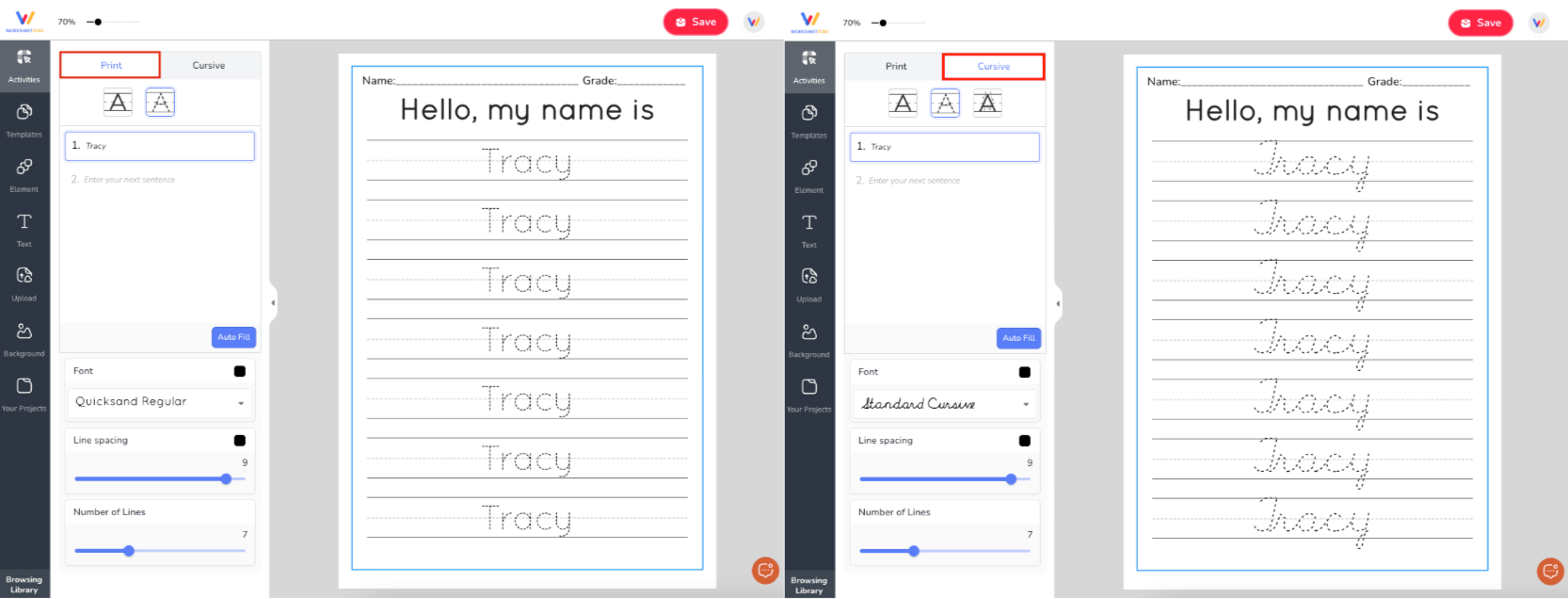
At the top of the name tracing panel, select between Print and Cursive font styles, depending on what you want your students to practice. The preview will automatically update on the right side so you can see the change in real time.
Step 4: Click “Auto Fill” to Duplicate the Name
After entering the name, click the blue “Auto Fill” button. This will instantly copy the name across all available writing lines on the worksheet, turning them into dotted tracing text.

This step saves time and ensures the entire sheet is consistent, allowing kids to get repetitive practice with the same word or name.
Step 5: Customize Your Worksheet (Optional but Recommended)
To make the worksheet even more effective for your learners, use the customization options available:
- Font Style: Choose from kid-friendly tracing fonts that support letter clarity and readability.
- Line Spacing: Use the slider to increase or decrease the space between lines – helpful for younger children who need more room to trace.
- Number of Lines: Adjust how many rows of tracing appear on the page using the second slider.
All changes are reflected instantly on the worksheet preview to the right.
Step 6: Save or Download Your Worksheet
Once you’re happy with the result:
- Click the red “Save” button in the top right corner to store the worksheet in your account. (Login required.)
- Or, download it as a PDF to print and use immediately in class or at home.
You can also organize saved worksheets by student, class, or theme using Worksheetzone’s project management features.

Other Tools You Can Use to Make Name Tracing Worksheets
If you’d like to explore more ways to make name tracing worksheets, there are several other tools worth checking out. Each offers its own style, customization options, and formats to fit different teaching and learning needs.
1. Name Tracing Worksheet Generator (worksheetprints.com)
A simple, web-based tool for making personalized, printable name tracing worksheets. It’s quick to set up and ideal for at-home or classroom use.

Highlights:
- Printable worksheets tailored specifically for name tracing.
- Standard letter-size format for easy printing anywhere.
Limitations:
- Focused only on static printables – no interactive tracing option.
- Basic customization without themed graphics or advanced design elements.
2. Create Printables Name Tracing Practice (createprintables.com)
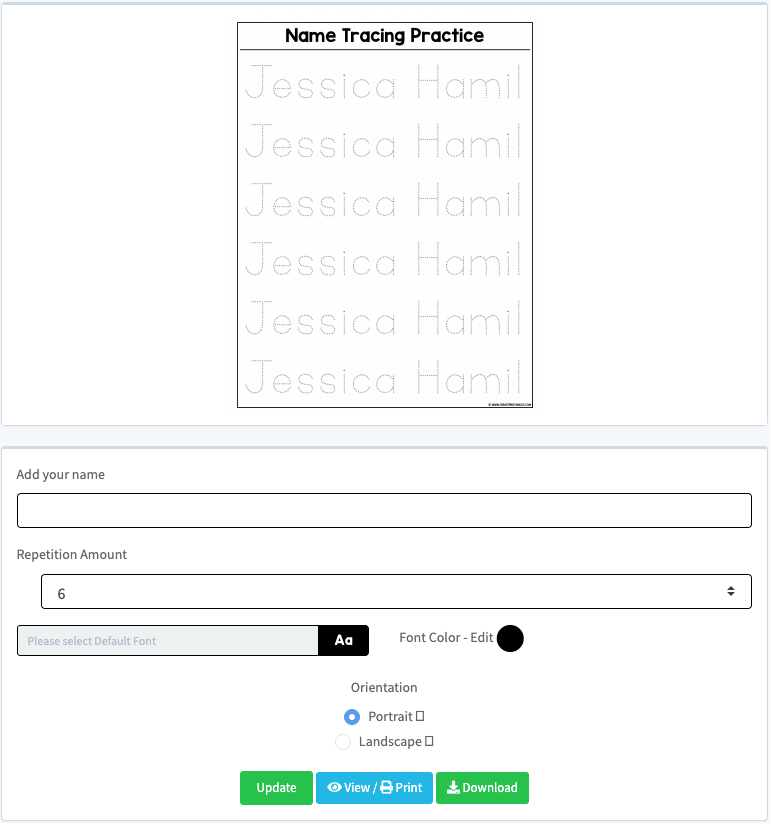
A versatile worksheet generator that supports a wide variety of names, including unique or less common ones. Perfect for multiple learning levels.
Highlights:
- Works with any first or last name, supporting diverse spelling needs.
- Great for preschool, kindergarten, homeschooling, and differentiated learning.
Limitations:
- Minimal interface that may require a little practice to format well.
- Manual setup needed for repetition and font changes.
3. Editable Name Tracing Worksheets on Teachers Pay Teachers
A library of editable templates you can quickly adapt for individual students or entire class lists. Available in both free and premium formats.

Highlights:
- Compatible with Adobe Acrobat Reader or PowerPoint for quick edits.
- Many free resources with strong teaching ratings, plus paid bundles.
Limitations:
- Requires downloading and working in external software.
- Free versions often have fewer customization options than paid sets.
- Editing depends on user familiarity with PDF or PPT tools.
Final Thoughts
The Name Tracing Generator on Worksheetzone is a powerful yet easy-to-use tool for helping young learners build essential handwriting skills. With its quick setup, autofill feature, and flexible customization options, you can make personalized worksheets that keep students engaged while practicing their names or keywords. Whether you prefer a simple print-and-go sheet or a fully tailored design, the generator adapts to your needs in minutes. Start experimenting today to give your students fun, effective, and memorable name-writing practice.